WNNZVCC ODWAV0005 Hdmi Converter Cable Handheld ODWAV005 PSP2000/PSP3000
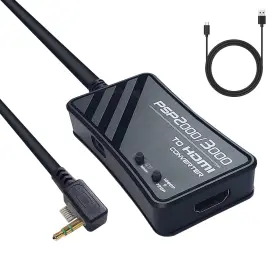
( Brand: Wnnzvcc ), ( Manufacturer Part Number: ODWAV0005 ), ( Part Type: Converter Cable ), ( Connectivity Technology: Hdmi, Usb ), ( Power Plug Type: No Plug ), ( Connector Type: Hdmi, Mini Usb ), ( Input Voltage: 5.0 ), ( Control Method: Touch ), ( Current Rating: 0.25 ), ( Finish Type: Matte ), ( Size: 6.69 3.93 0.98in ), ( Specific Uses For Product: Projector, Tv, Monitor ), ( Color: Black ), ( Model Number: Odwav005 ), ( Unit Count: 4.4 ), ( Package Dimensions Lxwxh: 6.77x3.98x1.02 Inches ), ( Weight: 0.37 Pounds )
Review WNNZVCC Psp 2000 /psp3000 To Hdmi Converter Cable For Handheld Co
Introducing the WNNZVCC Odwav0005 HDMI Converter Cable, an essential accessory for your PlayStation Portable (PSP) model PSP-2000 or PSP-3000. This high-definition multimedia interface (HDMI) cable enables you to connect your handheld gaming device to an HDTV or monitor, delivering stunning visuals and an immersive gaming experience.
Measuring at approximately 11 inches long, this cable is the perfect length for connecting your PSP to a TV or monitor while still allowing you to keep your device conveniently in your hand. Constructed with premium quality materials, it boasts a durable and flexible design that can withstand regular use without the risk of damage.
The WNNZVCC Odwav0005 HDMI Converter Cable supports both 480i and 720p resolutions, ensuring that your favorite PSP games and videos look sharp and clear on your larger display. The built-in HDMI to composite video and stereo audio converter allows you to enjoy your media even if your TV or monitor doesn't have an HDMI input.
Setting up the cable is a breeze. Simply connect one end to your PSP and the other end to your TV or monitor using the included HDMI connector. Once connected, your PSP will automatically detect the display and adjust the settings accordingly.
This HDMI converter cable also comes with an additional feature: the ability to charge your PSP while it's connected to the TV or monitor. No more worrying about running out of battery during long gaming sessions or movie marathons.
In summary, the WNNZVCC Odwav0005 HDMI Converter Cable is a must-have accessory for any PSP-2000 or PSP-3000 owner who wants to enjoy their games and media on a larger screen. With its high-quality construction, versatile connectivity options, and convenient charging feature, this cable is sure to enhance your portable gaming experience.
A PSP2000/PSP3000 HDMI converter cable allows playing PlayStation Portable games on larger screens, such as TVs or monitors. Here are some pros and cons of buying this cable:
Pros:1. Enhanced gaming experience: Playing PSP games on a larger screen can improve the overall gaming experience, especially for games with beautiful graphics.
2. Convenient: Watching movies or playing games on a larger screen is more comfortable, especially for long gaming sessions.
3. Versatile: The HDMI cable can be used to connect the PSP to various devices, including TVs, monitors, and projectors.
Cons:1. Additional cost: Buying an HDMI converter cable for the PSP adds to the overall cost of the device.
2. Compatibility issues: Some users have reported issues with the cable not working properly with certain PSP models or TVs.
3. Limited resolution support: The PSP only supports a maximum resolution of 480x272 pixels, so the image may not look as sharp as on higher resolution displays.
In conclusion, while an HDMI converter cable for the PSP can provide a more enjoyable gaming experience, it comes with some trade-offs, such as additional cost and potential compatibility issues. If you value the enhanced gaming experience and have a compatible device, it may be worth considering purchasing the cable. However, if you are on a tight budget or have concerns about compatibility, it may be best to consider other options.
Recommendation: Before purchasing an HDMI converter cable for your PSP, ensure that it is compatible with your specific device and TV. You may also want to consider alternative solutions, such as using a wireless display adapter or connecting the PSP to a monitor using a composite or component video cable. Ultimately, the decision to buy the cable depends on your individual needs and preferences.
Details:
Manually adjusting TV settings. Converter: 10 ft;. However, final output doesn't only depend on the cable quality but games you are playing and television. Easy to use Plug and play, no drivers required play games without delay.
There are 2 ways to display PSP on HDTV. Toggle to MENU when PSP menu display and toggle GAME playing games. This cable has been specifically calibrated for PSP 2000 / 3000. So its suggested to play PSP 2000 /PSP3000 without charging or with full charge get the best TV image.
High quality processors This converter provides the best amplified signal processing with extreme accuracy, color, resolution and detail to enjoy game. High quality maximizes compatibility with full-screen display trends. Press the Display Button down long enough until screen pops up in TV. Try to adjust the back light, brightness, dynamic setting or other parameters on TV if you want improve display more.
NOTE: Charging Issue. Menu: Settings > Connected Display Switch Video Output. Video Converter for classic gaming consoles provides a simple and high quality converter to connect HDTV/screen/projector etc.
part #: odwav0005 prices
- $39.98-$59.39
specifications consoleshay:
- brand: Wnnzvcc
- mpn: Odwav0005
- part type: Converter Cable
- connectivity technology: Hdmi, Usb
- power plug type: No Plug
- connector type: Hdmi, Mini Usb
- input voltage: 5.0
- control method: Touch
- current rating: 0.25
- finish type: Matte
- size: 6.69 3.93 0.98in
- specific uses for product: Projector, Tv, Monitor
- color: Black
- model number: Odwav005
- unit count: 4.4
- package dimensions lxwxh: 6.77x3.98x1.02 Inches
- weight: 0.37 Pounds
offer consoleshay:
- sold: 0
- options: Ship-to-home
- started: October 24, 2025
- availability: In Stock
- quantity: 1
general consoleshay:
- Video Games Consoles > Video Game Consoles
- condition: New
seller consoleshay:
- # reviews: 835
- city: Brentwood, New York
- rating: 100.0%
shipping consoleshay:
- class: Standard
- type: Fixed
- transit: 4-8 Days
- service: Standard
- cost: $0.00
returns consoleshay:
- paid by: Seller
- policy: Returns Accepted
- time: 30 Days
- method: Money back
payments consoleshay:
- credit card: Mastercard
- other
- wallet: Google-pay
